
What the integration does
Browse & search issues
Open the issue browser from the top bar to search, filter, read comments, and see cycle and sub-issue detail.
Attach issues
Connect a Linear issue to a lane or chat. ADE derives the lane and branch name and attaches the issue as context.
Commit & PR linkbacks
Connected lanes prefix commits with the issue reference and seed the PR title and body so Linear links the work back — and closes the issue on merge if you choose.
Live status (optional)
When enabled, ADE moves the issue to In Progress on launch, comments the PR link, and marks it Done on merge.
Connect Linear
Connect from Settings → Integrations, or from the CTO’s Settings sheet. There are two paths:1
Sign in with Linear (OAuth)
The primary path. ADE opens a Linear sign-in and stores the resulting token, refreshing it for you. The sign-in session is short-lived, so finish it promptly.
2
Personal API key
The alternative — paste a key that doesn’t expire. Good for headless or automated setups.
3
Test with one issue
Attach an issue to a lane and confirm it shows up in the lane and in chat context.
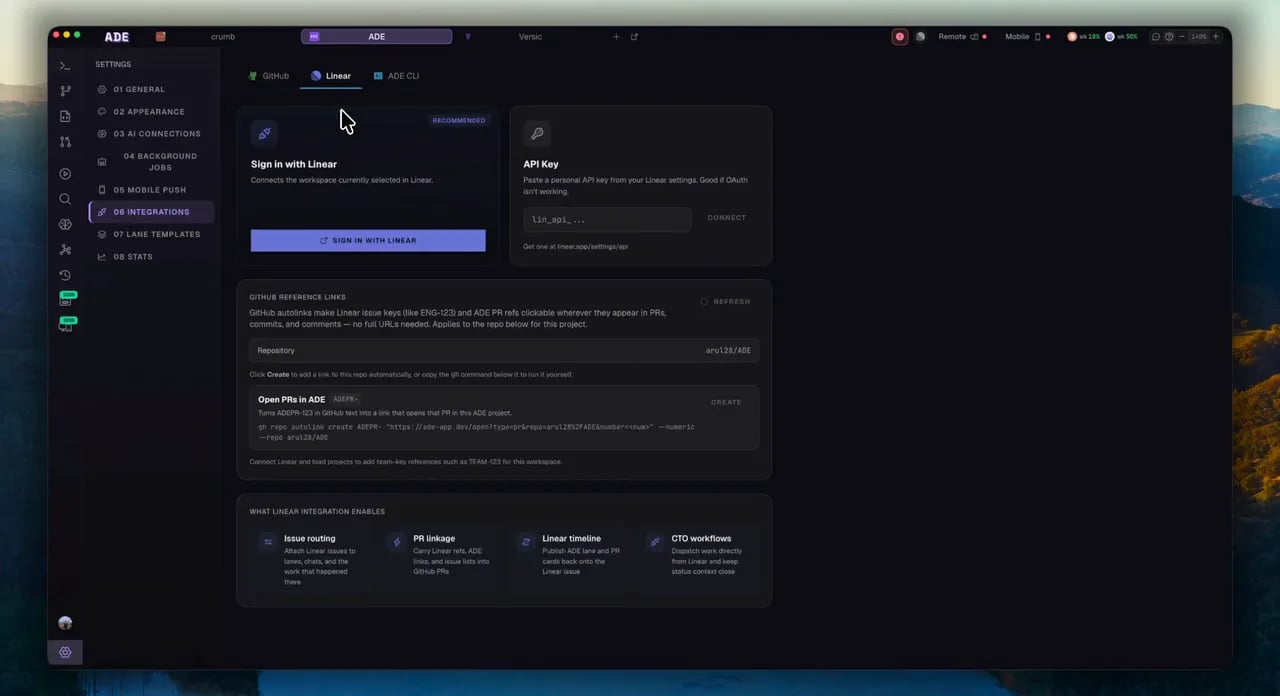
Connect a Linear workspace to ADE.
Until a token is stored, the integration stays dormant — nothing polls and nothing binds. Connecting is a deliberate act.
From issue to PR
The everyday flow starts with an issue and ends with a linked PR.1
Attach an issue
Create a lane from an issue (or attach one to an existing lane or chat). ADE derives the lane name and branch name from the issue and attaches it as context.
2
Work in the lane
The agent implements in its worktree. Commit messages are auto-prefixed with the issue reference.
3
Open a PR
The PR title and body are seeded from the issue, with a
Fixes or Refs magic word so Linear links — and optionally closes — the issue on merge.4
Live status (optional)
With the live-status round-trip enabled, ADE moves the issue to In Progress on launch, comments the PR link, and marks it Done on merge.
Launch several issues at once
From the issue browser you can multi-select issues and launch them together — one lane per issue, optionally with an agent kickoff prompt each. Failures are isolated so one bad issue doesn’t stop the rest, and you can retry just the ones that failed.Linear triggers in Automations are context-only. There is no autonomous issue-routing engine — any Linear write from an automation is an explicit rule action.
Good CTO prompts with Linear
Set up the CTO
Pick a personality and work style, then optionally choose a model and connect Linear.
CTO overview
The persistent operator that can browse and update Linear issues from its thread.