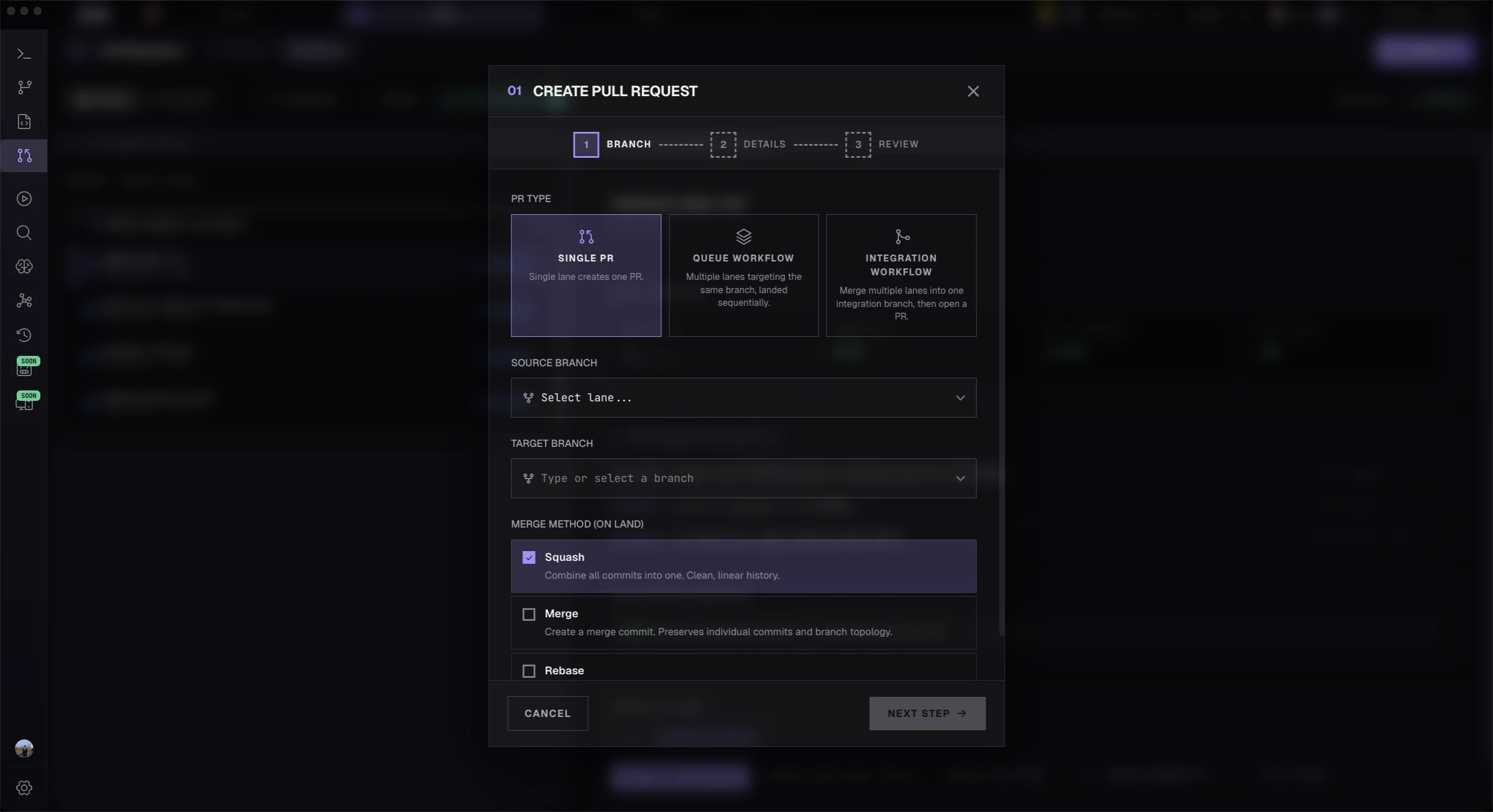
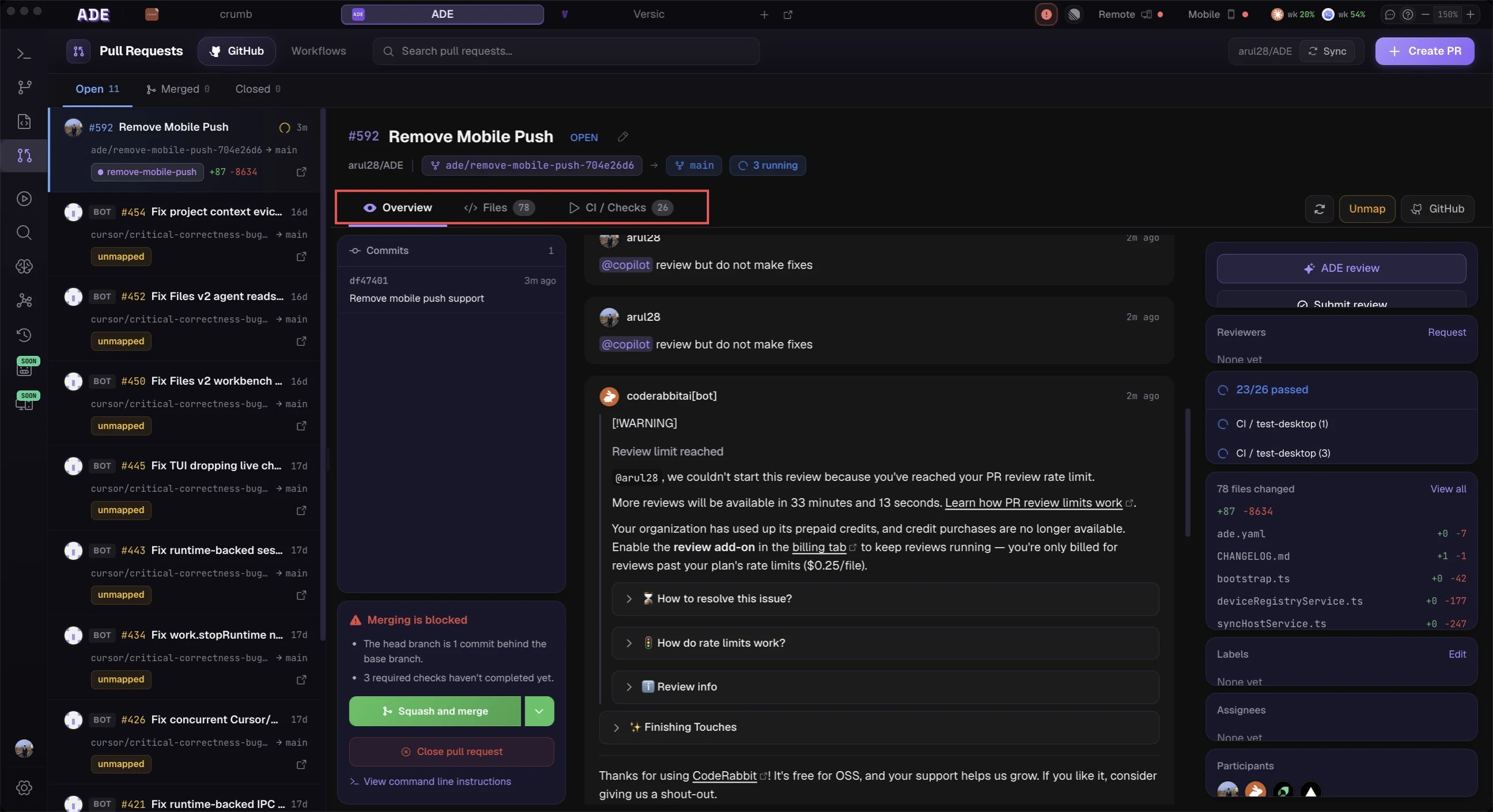
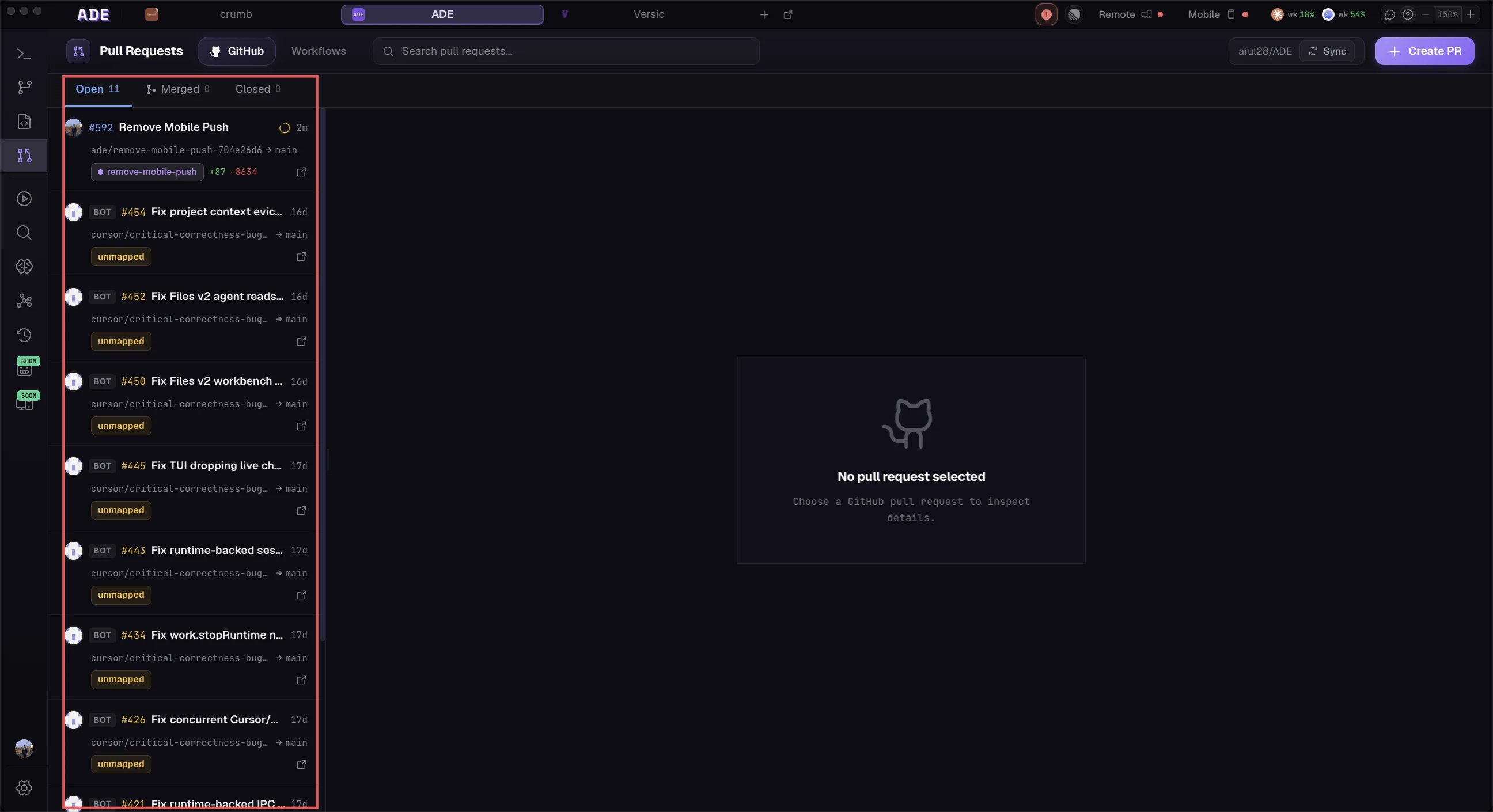
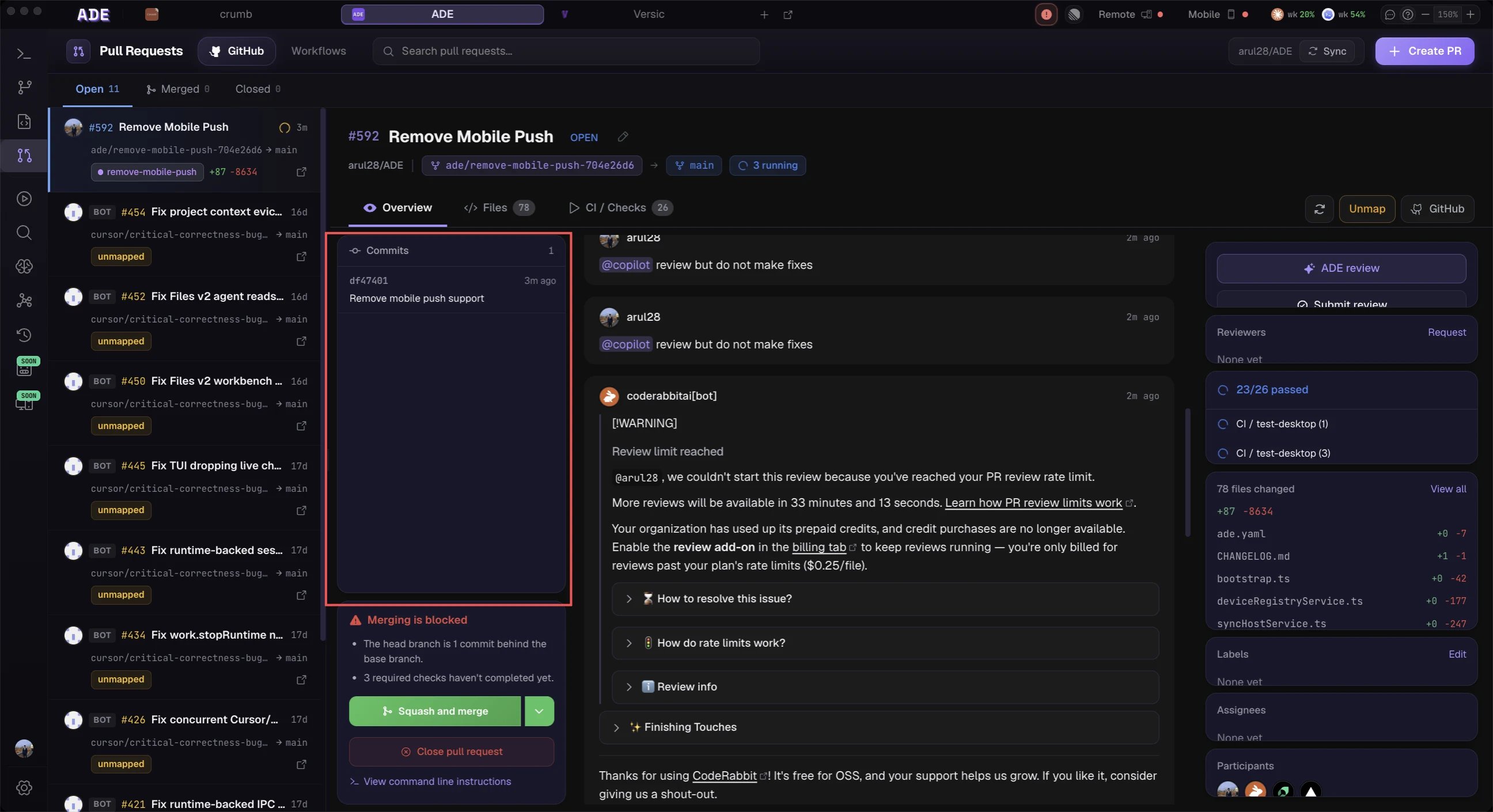
**Screenshot: The PRs tab in full split-pane layout — left panel showing a PR list with status badges (open, approved, draft, changes_requested) and lane name tags, right panel showing a PR detail view with the Overview tab active, displaying CI check status indicators, reviewer avatars, and a description rendered from markdown. A stacked PR dependency arrow should be visible between two items in the list.

What is the Pull Requests View?

The PRs tab is ADE’s full pull request management interface, connected directly to GitHub. It provides a complete view of every PR across all lanes in your project — their CI status, review state, and merge readiness — without requiring you to switch to a browser. Every lane can have one associated PR. ADE tracks the lane-to-PR link permanently and surfaces PR status inline in the Lanes view, the Workspace Graph, and the History timeline, in addition to the dedicated PRs tab.

Lane-to-PR Mapping

Each lane maps to exactly one PR. Creating a PR from a lane links them permanently — lane context pre-fills the PR form automatically.

Stacked PR Support

ADE manages the full lifecycle of stacked PRs: creates them targeting the right branches, rebases them when a parent merges, and merges the stack in the correct order.

Pre-Merge Simulation

Run an on-demand integration simulation before merging — ADE shows predicted conflicts, affected files, and risk level for the specific PR being merged.

Lane-to-PR Mapping

Every lane can have at most one associated PR at any time. The mapping is created when you open a PR from a lane and persists until the PR is closed or merged.
Lane StatePR Badge Shown
No PR created yet”Create PR” button
Draft PR openDraft badge (grey)
PR open, no reviewOpen badge (blue)
PR approvedApproved badge (green)
Changes requestedChanges Requested badge (amber)
PR mergedMerged badge (purple)
PR closed (unmerged)Closed badge (red)
The PR status badge is visible in the lane list (left pane of the Lanes tab), the Workspace Graph (as a label on the lane node), and the PR detail view itself.

Creating a PR from a Lane

1

Open the lane's PR action

In the Lanes tab, select the lane you want to create a PR for. In the right inspector’s PR sub-tab, click Create PR. Alternatively, click the Create PR button in the lane list row’s action menu (⋮).
2

Review the pre-filled form

ADE pre-fills the PR creation form with context sourced from the lane:
  • Title — generated from the lane’s intent (from its Lane Pack)
  • Description — the lane’s intent, acceptance criteria, and diff summary, formatted as markdown. If your repository has a .github/pull_request_template.md, the template is prepended and the Lane Pack content is appended below it.
  • Base branch — the lane’s base branch. For stacked lanes, this is automatically set to the parent lane’s branch (not main).
  • Reviewers — any reviewers configured in the lane settings or in .ade/ade.yaml
  • Labels — labels mapped to the lane’s associated Linear issue (if connected)
**Screenshot: The “Create PR” form filled in — title field showing “feat: add session expiry logic”, description showing a formatted markdown body with an “Intent” section and an “Acceptance Criteria” checklist, base branch dropdown showing “main”, and a “Reviewers” field with two user avatars. A “Draft PR” toggle should be visible and enabled.
3

Toggle draft mode if needed

If the work is not ready for review, enable the Draft PR toggle. Draft PRs are tracked by ADE but will not be auto-merged even if CI passes and all reviews are complete. Draft mode can be toggled per-lane in lane settings.
4

Submit the PR

Click Create Pull Request. ADE calls the GitHub API, creates the PR, and immediately links it to the lane. The lane’s PR badge updates to reflect the new state.

Stacked PRs

ADE has first-class support for stacked PR workflows, where a series of lanes build on each other and their PRs target each other (rather than all targeting main).
**Screenshot: The PR list showing a stack of 3 PRs — “auth-base”, “auth-middleware”, “auth-endpoints” — connected by vertical dependency arrows indicating merge order (bottom up). Each PR shows its CI status indicator. The bottom PR (“auth-base”) has a green “Approved” badge, the middle is “Open”, and the top is “Draft”.

How Stacked PRs Are Structured

When a lane is stacked (its base branch is another lane’s branch), ADE automatically targets that lane’s branch when creating a PR:
main
└── lane/auth-base         → PR #42 targets: main
    └── lane/auth-middleware   → PR #43 targets: lane/auth-base
        └── lane/auth-endpoints  → PR #44 targets: lane/auth-middleware
This allows reviewers to review each layer of changes in isolation, without the noise of all changes combined.

When a Parent PR Merges

When PR #42 (lane/auth-basemain) is merged:
  1. ADE detects the merge event via GitHub webhook / polling
  2. ADE automatically rebases lane/auth-middleware onto main (since its parent has now landed on main)
  3. The target branch of PR #43 is updated from lane/auth-base to main
  4. If the rebase encounters conflicts, the affected lane enters conflict status and the rebase pauses for manual resolution
  5. The process repeats for each subsequent lane in the stack
The automatic rebase on parent merge is enabled by default. You can disable it per-stack in .ade/ade.yaml under stacks.auto_rebase_on_parent_merge: false if you prefer to handle rebase timing manually.

Stack Management

The PR list displays stacked PRs with indentation and dependency arrows. The stack header row shows:
  • Total PRs in the stack
  • Number approved / pending / failing CI
  • Merge Stack button (enabled when the bottom PR is ready to merge)

PR Detail View

Select any PR in the list to open its full detail in the right panel. The detail view has five tabs.
The Overview tab shows the full PR summary:
  • Title and description — rendered markdown, with edit button (requires GitHub auth)
  • Status badges — PR state, draft indicator, merge readiness score
  • CI checks — all GitHub Actions checks with their current status (passing, failing, pending, skipped). Click any check to see its log output in an inline log viewer.
  • Reviewers — reviewer avatars with approval/changes-requested/pending state
  • Assignees and labels
  • Base branch and head branch
  • Creation date and last updated timestamp
  • Conflict Risk badge — the latest integration simulation result for this PR
If CI is failing, ADE highlights the failing check and offers an “Ask CTO about this failure” button. This routes to the CTO chat with the CI log pre-loaded as context, so you can ask what went wrong and how to fix it without manually reading the log.

PR Actions

All PR actions are available from the detail view’s action bar at the top of the right panel.
Pulls fresh context from the lane’s current Lane Pack and regenerates the PR description. Useful after significant new commits have landed on the lane. ADE shows you a diff of what changed in the description before submitting the update.
Opens the reviewer picker. Search by GitHub username or team name. ADE suggests reviewers based on code ownership (from CODEOWNERS if present) and previous review history for the affected files.
If you are listed as a requested reviewer, the Approve and Request Changes buttons are active. Submit an optional review comment with either action.
Converts a draft PR to a ready-for-review PR. ADE sends a Slack / Linear notification to configured channels (if integrations are enabled) when a PR moves from draft to ready.
Opens the merge dialog. Select merge strategy (see Merge Strategies below), optionally edit the merge commit message, and confirm. ADE calls the GitHub merge API and waits for the merge to complete before updating the UI.
Closes the PR without merging (does not delete the branch). Reopen is available for closed (not merged) PRs.

CI/CD Integration

ADE polls GitHub Actions for CI status on all linked PRs. The CI check list is visible in the PR Overview tab and as an icon badge on the PR list entry.
**Screenshot: The CI checks section of the PR Overview tab — showing 4 checks: “build” (green checkmark), “unit-tests” (green checkmark), “e2e-tests” (red X with “2 failures” label), “lint” (green checkmark). The “e2e-tests” row is expanded showing a truncated log output with red error lines. An “Ask CTO about this failure” button sits below the log.

Reading CI Status

IconStatusMeaning
Green checkmarksuccessCheck passed
Red XfailureCheck failed
Yellow spinnerpendingCheck is running
Grey dashskippedCheck was skipped
Orange exclamationaction_requiredManual action needed

Viewing CI Logs

Click any check name to expand its log output inline in the Overview tab. Logs are syntax-highlighted for common CI output formats (Go test output, Jest, pytest, etc.). Use Cmd+F inside the log viewer to search for specific error text.

CI Failure Assistance

When any required check fails, a “Ask CTO about this failure” button appears below the failing check. Clicking it:
  1. Opens the CTO chat panel
  2. Pre-loads the failing check’s log output as context
  3. Pre-fills the message: “CI is failing on PR #[N] in the [check-name] step. Here’s the log: […]”
The CTO agent reads the log, identifies the root cause, and proposes a fix — either as inline suggestions or by creating a new agent session in the PR’s lane.

Merge Strategies

ADE supports all three GitHub merge strategies. Select the strategy in the merge dialog.
StrategyDescriptionWhen to use
Merge commitCreates a merge commit with all individual commitsWhen you want the full commit history preserved
Squash and mergeSquashes all commits into one before mergingWhen individual commits are noisy and you want a clean history
Rebase and mergeReplays commits linearly onto the base branchWhen you want linear history without a merge commit
For stacked PR workflows, ADE enforces the same merge strategy across the entire stack. This prevents history fragmentation when a stack of PRs is merged in sequence. Set the stack-level strategy in .ade/ade.yaml under stacks.merge_strategy.

Stack Merge Workflow

The Merge Stack feature merges all PRs in a stack from bottom to top in the correct order, automatically rebasing each subsequent PR after the previous one lands.
1

Verify stack readiness

In the PR list, open the stack header row. The readiness summary shows how many PRs in the stack are approved and CI-passing. All PRs must be in a mergeable state before the stack merge can proceed.
2

Click 'Merge Stack'

The Merge Stack button is enabled when all PRs in the stack are approved and all required CI checks have passed. Click it to open the Stack Merge dialog.
3

Review the merge order

The dialog shows the planned merge order (bottom-up) and the merge strategy to be used. Review and confirm.
4

Monitor the merge sequence

ADE merges PR #1 (the bottom of the stack), then immediately rebases PR #2 onto main and updates its target branch, then merges PR #2, and so on. A progress indicator tracks each step.If a merge step fails (e.g., because the rebase encountered a conflict), the process pauses and surfaces the conflict for resolution. After you resolve it, click Resume Stack Merge to continue.
The Stack Merge operation calls the GitHub API sequentially for each PR. If your CI requires a final check after each rebase (which is common), the process will wait for CI to pass on the rebased PR before proceeding to the next merge. This can take several minutes per PR in a large stack. Monitor the progress indicator — you do not need to stay in the PRs tab while this runs.

Draft PRs

Lanes created with “draft” mode produce draft PRs. Draft mode can be set:
  • At lane creation time (in the New Lane dialog, under Advanced)
  • After creation, in the Lane Settings (kebab menu ⋮ > Settings > PR Settings > Draft mode)
  • Per-project default in .ade/ade.yaml:
# .ade/ade.yaml
prs:
  default_draft: true   # all new PRs start as drafts
ADE will not auto-merge a draft PR even if CI passes and all required reviews are approved. You must explicitly mark it as ready (via the Mark as Ready action) before a merge is possible.

PR Templates

ADE respects .github/pull_request_template.md if present in your repository. When generating a PR description, ADE:
  1. Loads the template content
  2. Appends the lane’s intent and acceptance criteria (from the Lane Pack) below the template
  3. Fills in any template sections it can infer (e.g., “Type of change” checkboxes based on the diff)
If you have multiple PR templates (in .github/PULL_REQUEST_TEMPLATE/), ADE presents a dropdown to select which template to use when creating the PR.

Troubleshooting

GitHub requires the PR branch to be up to date with its base branch before merging (when branch protection rules require this). In the PR Overview, click Update Branch — ADE will rebase or merge the base branch into your PR branch. If conflicts arise during the update, the lane enters conflict status and the Conflicts tab shows the details.
The PR description was generated from an earlier Lane Pack. Click Update PR Description in the action bar — ADE regenerates the description from the current Lane Pack state. Review the diff in the preview before submitting the update to GitHub.
Use the “Ask CTO about this failure” button in the PR Overview to route the CI log to the CTO agent. Common causes ADE’s CTO agent detects: missing environment variable in CI, test file not updated after a function rename, outdated snapshot, or a flaky test. The CTO agent will propose a fix.
If a conflict arises during a stack merge rebase, the process pauses. The Conflicts tab will show the conflict. Resolve it using the standard conflict workflow, then return to the PRs tab and click Resume Stack Merge. The sequence picks up from the point it paused — it does not restart from the beginning.
If the underlying GitHub PR was merged or closed directly on GitHub (not through ADE), ADE will detect the state change on the next poll cycle (within 2 minutes) and update the lane badge accordingly. If the sync seems stuck, click the Refresh icon in the PR detail header to force an immediate re-fetch from the GitHub API.
Posting comments and submitting reviews requires a GitHub personal access token with pull_requests: write scope, or a GitHub App installation. Configure GitHub authentication in Settings > Integrations > GitHub. Read-only PR viewing (status, diffs, CI) works with a read-only token or the public GitHub API.

Configuration Reference

Key PR-related settings in .ade/ade.yaml:
# .ade/ade.yaml
prs:
  default_draft: false           # start new PRs as drafts by default
  auto_update_description: true  # regenerate PR description on each new commit
  template: ".github/pull_request_template.md"  # override template path

stacks:
  auto_rebase_on_parent_merge: true  # rebase child lanes when parent PR merges
  merge_strategy: squash             # merge | squash | rebase (for entire stack)

conflicts:
  block_merge_on_simulation_failure: true  # prevent merge if simulation shows Red risk

What’s Next

Conflicts

Understand how integration simulations relate to the continuous conflict prediction engine.

Lanes

Learn how stacked lane relationships drive the stacked PR workflow automatically.

History

See every PR event — reviews, CI changes, merges — in the project operations timeline.

CTO Agent

Let the CTO agent monitor PR CI health, triage failures, and delegate fixes to worker agents.