Documentation Index
Fetch the complete documentation index at: https://ade-app.dev/docs/llms.txt
Use this file to discover all available pages before exploring further.
Supported Providers
ADE supports multiple AI provider categories, configurable in any combination.Anthropic (Claude)
Default and recommended. Models:
claude-opus-4-7, claude-sonnet-4-6, claude-haiku-4-5. Best for complex reasoning, long-context tasks, and code review.OpenAI
Supported via the OpenAI API. Models:
gpt-4o, gpt-4o-mini, o1, o3. Best for structured output, code completion, and tool use.OpenRouter
Route to hundreds of models through a single API key. Useful for cost optimization, model comparison, and accessing open-source models (Llama, Mistral, Gemini).
OpenCode
OpenCode runs as a local server process and exposes an OpenAI-compatible endpoint. Supports API key, OpenRouter, and fully local model configurations. See Windsurf / OpenCode for setup.
Local Models
Via Ollama or LM Studio. Point ADE to a local OpenAI-compatible endpoint — no API key required. Best for offline use or privacy-sensitive codebases.
Provider Comparison
| Provider | Best For | Context Window | Requires API Key |
|---|---|---|---|
| Anthropic Claude | Complex reasoning, long-context, code review | Up to 1M tokens | Yes |
| OpenAI GPT | Structured output, code completion, tool use | Up to 128K tokens | Yes |
| OpenRouter | Cost optimization, model comparison | Varies by model | Yes |
| OpenCode | Local server runtime, flexible model backends | Varies by model | Optional |
| Ollama / LM Studio | Offline, privacy-sensitive work | Varies by model | No |
Where to Configure Providers
Provider configuration lives in three places:local.secret.yaml— API keys and endpoint URLs. Never committed to git.ade.yaml— Default model and budget defaults. Committed to git and shared with your team.- Settings → AI Providers — GUI for adding/rotating keys, testing connections, and setting per-provider defaults. Writes to
local.secret.yamlon save.
Setting Up Anthropic (Claude)
Get an API key
Go to console.anthropic.com and create an API key. Keys start with
sk-ant-.Set the default model in ade.yaml
claude-opus-4-7, claude-sonnet-4-6, claude-haiku-4-5.Setting Up OpenAI
Get an API key
Go to platform.openai.com and create an API key. Keys start with
sk-.Setting Up OpenRouter
OpenRouter provides a single API key that routes to hundreds of upstream models. This is useful for comparing models, accessing open-source models, or optimizing cost by routing different agent types to cheaper models.- Anthropic via OpenRouter
- OpenAI via OpenRouter
- Open-Source via OpenRouter
OpenRouter model identifiers use the format
<provider>/<model-name>. Find the full list at openrouter.ai/models. When using OpenRouter, the model string you set in ade.yaml should use the OpenRouter format, prefixed with openrouter: — for example: openrouter:anthropic/claude-opus-4-7.Setting Up Local Models (Ollama)
Local models run entirely on your machine. No API key is needed. ADE communicates with locally-running Ollama or LM Studio through their OpenAI-compatible API endpoints.Install and start Ollama
Configure the local endpoint in local.secret.yaml
http://localhost:1234/v1 (or your configured port).Model Reference
Anthropic (Claude)
| Model | Context Window | Best For |
|---|---|---|
claude-opus-4-7 | 1M tokens | Complex reasoning, architecture review, long-context analysis |
claude-sonnet-4-6 | 200K tokens | General coding tasks, balanced speed and quality |
claude-haiku-4-5 | 200K tokens | Fast, lightweight tasks; automation runs; high-volume tool calls |
OpenAI
| Model | Context Window | Best For |
|---|---|---|
gpt-4o | 128K tokens | Structured output, JSON generation, tool use |
gpt-4o-mini | 128K tokens | Cost-efficient tasks, simple completions |
o1 | 128K tokens | Deep reasoning, math, multi-step logic |
o3 | 128K tokens | Advanced reasoning with extended compute |
Permission modes
Chat and Missions share the same permission picker. Each provider exposes a small set of presets that map directly to provider flags.Claude
| Mode | Allows | Gates |
|---|---|---|
plan | Read, search, plan | All writes and shell |
edit | Read, edit inside the worktree | Network and out-of-worktree paths |
full-auto | Full tool access | Nothing — use only where appropriate |
default | Standard Claude CLI defaults | Per Claude’s CLI config |
Codex (via the Codex CLI)
Codex presets combine--approval-policy and --sandbox.
| Mode | Approval policy | Sandbox | Use when |
|---|---|---|---|
default | on-request | workspace-write | You want Codex to edit inside the workspace and ask before touching network or paths outside it. Standard middle ground. |
plan | on-request | read-only | You want exploration only — reads and answers, approvals required for anything else. |
full-auto (Full access) | never | danger-full-access | You are running inside a stronger external sandbox. Skips every approval prompt. |
config-toml (Custom) | — | — | ADE passes no --approval-policy or --sandbox. Codex honors its own config (~/.codex/config.toml). |
on-request approval policy rather than on-failure. The Codex sandbox in Missions is derived from the chosen mode — the separate sandbox dropdown has been removed from the Worker Permissions editor.
OpenCode
OpenCode follows its own internal permission scheme. Set it tofull-auto for the standard preset; override in OpenCode’s config when the project needs a different boundary.
Model Selection by Context
ADE lets you assign different models to different agent roles. This is the recommended approach for cost efficiency: use Opus for planning and architecture, Sonnet for execution, and Haiku for automation runs.Budget Configuration
Budget caps prevent runaway spend from long-running agents or automation loops. Caps are enforced in the main process — when a session reaches its cap, the agent receives a stop signal and the session ends gracefully.Per-session budget
Per-session budget
Applied to chat sessions in the Agent Chat pane. When the session’s cumulative cost reaches this value, the agent receives a stop signal. You can raise the cap for the current session in the chat header without editing config.
Per-mission budget
Per-mission budget
Applied to the entire mission run, summing across all workers. If the combined worker spend reaches the cap during execution, the orchestrator suspends remaining tasks and surfaces an intervention request asking whether to extend the budget or abandon the mission.
Per-automation budget
Applied per automation trigger event. Each time an automation fires, it gets a fresh budget for that run. Useful for keeping PR review automations economical.
Monthly cap
Monthly cap
A hard ceiling across all providers, all agents, all sessions. Once reached, all agent activity pauses. ADE shows a banner and sends a notification. The cap resets on the first day of each calendar month. You can raise or reset it in Settings → Budget.
Context Compaction
ADE monitors context usage for every active agent session. When usage reaches the configured threshold (default 70%), ADE automatically compacts the context to free space. How compaction works:- ADE identifies the oldest message segments in the context window
- A compaction request is sent to summarize those segments into a compact narrative
- The summary replaces the original messages in the context
- Key details (function signatures, file paths, error messages, agent decisions) are preserved verbatim in the summary
Some providers handle large contexts better than others. If you notice quality degradation at high context usage with a specific provider, lower the compaction threshold for that provider. Per-provider thresholds can be set in Settings → AI → Context Management.
API Key Security
API keys are handled according to ADE’s trust boundary model:- Storage: Keys live only in
local.secret.yamlon disk. ADE reads them into main process memory at startup. - In-memory handling: Once loaded, keys are held in the main process (Electron main) only. They are never passed to the renderer process.
- SQLite: Keys are never written to ADE’s SQLite database. The database stores session metadata, costs, and audit records — not credentials.
- Log redaction: Any key value that appears in log output is automatically redacted and replaced with
***. - IPC bridge: The preload bridge does not expose any IPC channel that returns raw API key values to the renderer.
Troubleshooting
Authentication error (401)
Your API key is invalid or has been revoked. Verify the key value in
local.secret.yaml — ensure there are no leading or trailing spaces, and that the key is for the correct provider. Anthropic keys start with sk-ant-; OpenAI keys start with sk-.Rate limit exceeded (429)
Rate limit exceeded (429)
You are hitting the provider’s rate limit. ADE automatically retries with exponential backoff (up to 3 retries). If rate limits are consistently hit, consider: (1) switching to a less popular model tier, (2) upgrading your API plan, or (3) routing some agents through OpenRouter which aggregates capacity.
Monthly quota exceeded
Your provider account has exhausted its monthly quota. This is separate from ADE’s budget cap — it is a limit set by the provider. Log in to your provider’s billing dashboard to review and increase your quota. ADE will resume automatically once the provider accepts requests again.
Model not found (404)
The model string in
ade.yaml does not match a valid model ID for the configured provider. Check the exact model IDs in the Model Reference table above. Model IDs are case-sensitive.Local model not responding
Local model not responding
If using Ollama, confirm that
ollama serve is running and that the model is pulled (ollama list). Verify the baseUrl in local.secret.yaml matches the port Ollama is listening on (default 11434). Use Test Connection in Settings → AI Providers → Local to get the exact error.Context window exceeded
Context window exceeded
The agent’s conversation has exceeded the model’s context limit even after compaction. Options: (1) lower the compaction threshold so compaction fires earlier, (2) start a new session (the Lane Pack will provide continuity), (3) switch to a model with a larger context window.
What’s Next
Settings
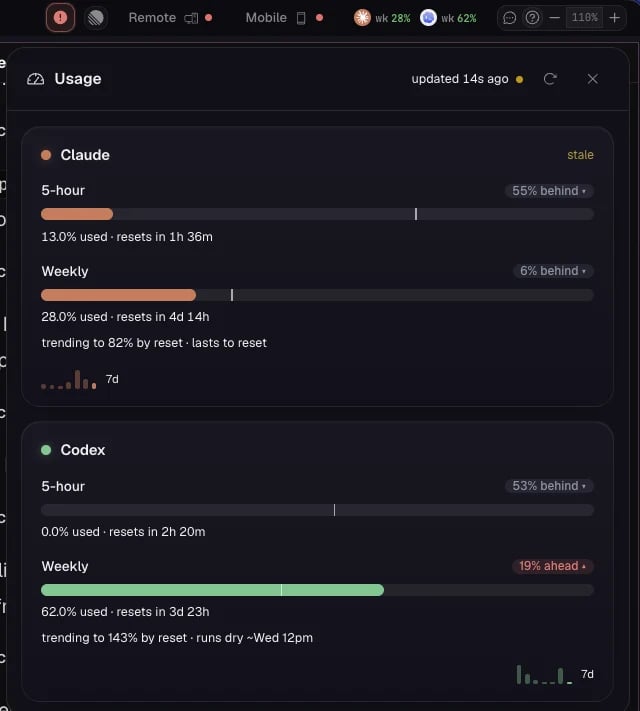
Configure usage graphs, notification thresholds, and per-agent model overrides.
Permissions
Review the trust boundary model and configure per-agent access rules.
Missions
Learn how model routing rules apply during mission planning and execution phases.
Permissions
Understand how API keys are protected by ADE’s trust boundary architecture.